
How I code with AI: October 2025
Four phases, two prompts, and what I learned from all the rework

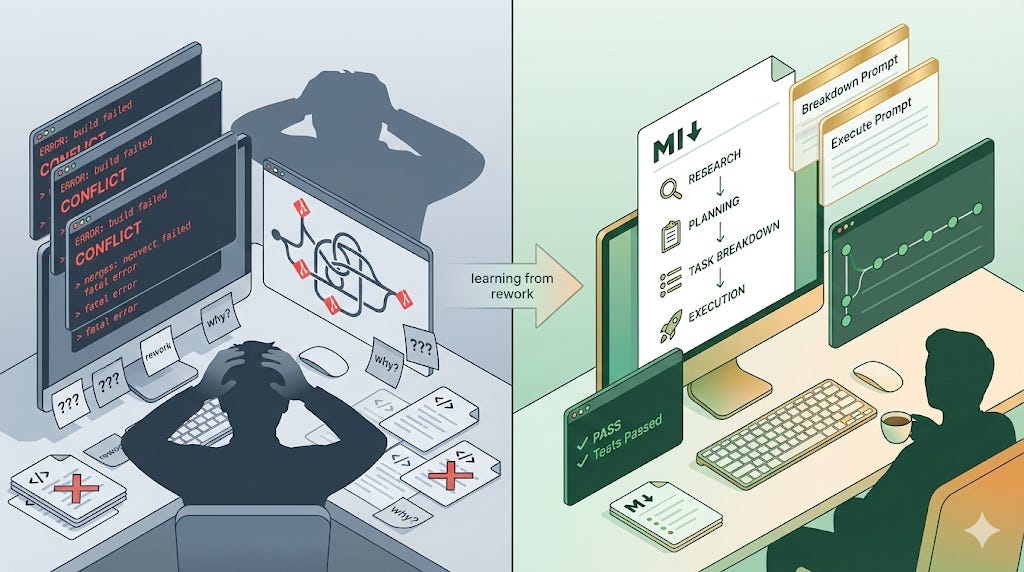
TL;DR
Not pure vibe coding — I use a structured workflow with AI: Research, Planning, Task Breakdown, Execution
Planning beats prayers: alignment happens upfront before any code gets written
Just 2 prompts for spec-driven development, simpler than external tools like Spec Kit
Use expensive models (Sonnet) for planning, cheap models (Haiku/GLM) for execution
Controllable autonomy: task-by-task review or full auto depending on project criticality
Introduction
I’ve been building a lot of tools and projects with AI agents lately. After a lot of trial and error — and some painful rework — I’ve settled into a workflow that’s been working really well for me. I wanted to share what that looks like.
This isn’t pure “vibe coding“ — where you describe what you want in English and the AI writes everything while you never look at the code. That approach creates problems. It’s also not traditional coding where AI is just autocomplete. Somewhere in between.
The core principle: planning beats prayers when it comes to LLMs. Give the AI too much freedom without structure, and it’ll drift. By the time you realize it, you’ve spent more time fixing things than if you’d just written the code yourself.
My Setup
I use Cursor and Claude Code. The workflow is the same across both — just different ways to invoke the same prompts.
For models: Claude Sonnet 4.5 for planning and task breakdown, Claude Haiku 4.5 or GLM-4.6 for execution. The key insight here is that once planning is done, you can use a cheaper model for the actual implementation. The heavy thinking is already finished.
I use three MCP servers:
Perplexity for search and research
Firecrawl for reading web pages
Context7 for technical documentation
These help work around knowledge cutoffs. Instead of Googling across multiple pages to find best practices, the AI can research directly.
I manage prompts as slash commands in Claude Code (stored in a GitHub repo) and as Alfred snippets in Cursor. Haven’t figured out a good way to sync them yet.
All planning and task breakdowns go into markdown docs in docs/memory/ within each repo. This makes it easy to switch between chat threads or even tools — all the context lives in the document, not scattered across conversations.
The Workflow
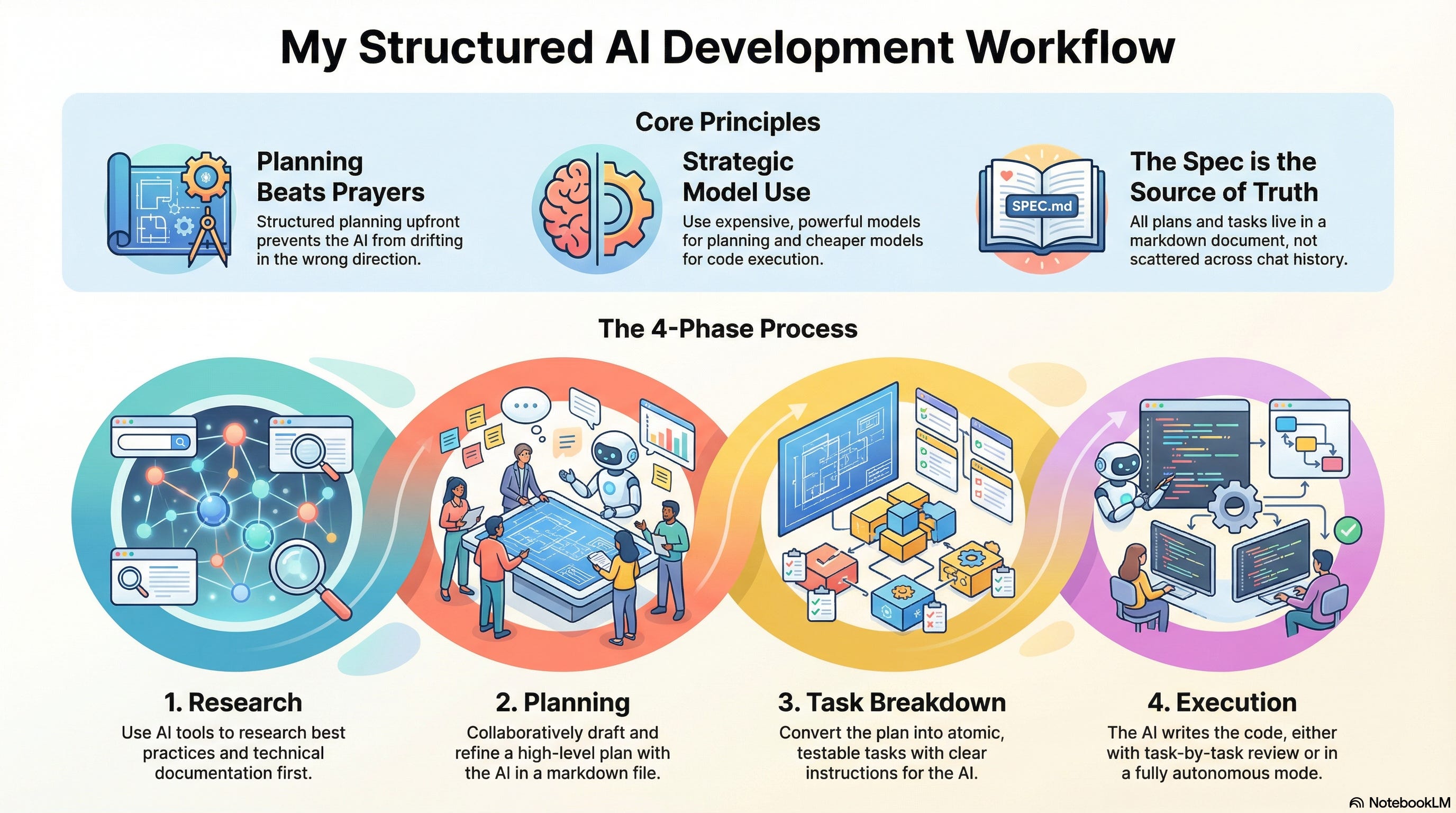
Four phases: Research, Planning, Task Breakdown, Execution.
Phase 1: Research
Before I start planning, I use the MCP servers to research. Perplexity for general search and deep research. Firecrawl for reading specific web pages. Context7 for technical documentation.
This solves two problems: LLMs have knowledge cutoffs, and I don’t want to spend time manually Googling. The AI can research best practices and current approaches directly, which gives us both context before we start planning.
Phase 2: Planning
I don’t have a fixed planning prompt — it varies by project complexity and what I already know. The AI drafts a high-level plan, I review it, we refine together.
What I’m checking for: alignment with how I want to approach the problem, and the technical decisions the AI is making. Too vague? I ask for more detail. Too detailed? I tell it to pull back.
This all happens in a markdown document. I can see the plan as diffs in my editor, which makes it easy to review changes. All this before any code gets written.
This is where the heavy lifting happens. Once the plan is solid, the rest flows more easily. I’m still figuring out what makes a “good enough” plan, but I know it when I see it.
Phase 3: Task Breakdown
The plan gets broken down into atomic tasks. This is where the structure really matters.
Key principles that make this effective:
Single atomic unit of work - each task results in running, testable code
Progress over perfection - ship working code, iterate later, every task leaves the repo in a working state
Detailed enough for one-shot implementation - the LLM prompt has step-by-step instructions
Concrete definition of “done” - what exactly is finished when the task completes
Automated validation - prefer tests/scripts over manual checks
These constraints keep the AI focused and make review manageable. If a task is too big or vague, it’s easy for the AI to drift.
This is what my breakdown prompt looks like (formatted as a slash command):
---
argument-hint: [SPEC DOCUMENT]
description: Create a task breakdown from a design document
---
Document: $1

You are my project-planning assistant.
Given a high-level feature or milestone description in the above document, produce an **agile task breakdown** in the following strict Markdown format, and update the above document.

For every task you generate, include:
1. **Iteration header** – `### 🔄 **Iteration <n>: <Theme>**`
2. **Task header** – `#### Task <n>: <Concise Task Name>`
3. **Status** – always start as `Status: **Pending**`
4. **Goal** – 1-2 sentences describing the purpose
5. **Working Result** – what is concretely “done” at the end of the task (code that runs, command that passes, etc.)
6. **Validation** – a checklist (`- [ ]`) of objective pass/fail checks (tests, scripts, CI runs, manual verifications)
7. **LLM Prompt** – a fenced <prompt></prompt> block with step-by-step instructions detailed enough for a coding LLM to implement the task in one shot
8. Separate tasks and iterations with `---`

Constraints & conventions:
- Each task must be a single atomic unit of work that results in running, testable code.
- Favor incremental progress over perfection; every task should leave the repo in a working state.
- Validation should prefer automated tests/scripts but may include human review items.
- Use present-tense, imperative verbs for prompt steps (e.g., “Create…”, “Add…”, “Run…”).
- Use **bold** for filenames, routes, commands, etc. inside prompts to improve readability.
- Keep the entire answer pure Markdown; do not embed explanatory prose outside of the required structure.
- You may run into output token limits, so write one iteration at a time in the document, then add another one
The AI adds tasks to the same markdown document. I review them there — easy to see as diffs, easy to understand what changed.
Phase 4: Execution
Now the AI actually builds it. Two modes, depending on the project.
Task-by-task: The AI does a task. I review it, test it, commit it, move to the next one. This is what I do for critical projects or when I have time.
Autonomous (--auto flag): The AI does everything — completes tasks, commits with descriptive messages, moves to the next task. I come back later, and the work is done. I use this for internal tools or when I’m low on bandwidth.
And here’s what the execution prompt looks like (again, formatted as a slash command):
---
description: Do the actual task
argument-hint: [SPEC DOCUMENT] [TASK NUMBER | --resume] [ADDITIONAL CONTEXT] [--auto]
---
**Flags:**
- `--resume`: If present, the agent starts from the first incomplete task instead of the specified task number
- `--auto`: If present, the agent will automatically:
  1. Perform the task
  2. Commit changes with a descriptive message describing what was done
  3. Move to the next task
  4. If unable to complete a task, update the document with current progress and stop for user feedback

# Instructions
1. Update the document when you start by changing the task status to **In Progress**
2. Read the full task including the LLM Prompt to guide your approach
3. Perform the actual task:
   - Follow the step-by-step instructions in the task’s `<prompt>` block
   - Implement the code/changes needed to meet the “Working Result” criteria
   - Ensure the implementation passes the “Validation” checklist
4. After completion:
   - Update the document with your progress
   - Change task status to **Complete** if finished successfully
   - If using `--auto` flag, create a commit with a message describing what was done (e.g., “Initialize Repository”, “Set up API endpoints”, not “Complete task 1”)
   - Move to the next task if `--auto` is enabled
5. If unable to complete the task:
   - Document what was attempted and any blockers
   - Update task status to **Blocked** or **Pending Review**
   - If `--auto` is enabled, stop and request user feedback before proceeding

Context: $1
Implement task $2
$ARGUMENTS
The tasks are granular enough that I can review them without a lot of cognitive load. And because planning is done, I can use cheaper models for execution — Haiku 4.5 or GLM-4.6 instead of Sonnet 4.5.
I tested this recently building a CLI tool for making mass updates across multiple codebases. It was late evening, I was tired, but I wanted to get it done. We did the planning and task breakdown together — that part I was careful about. Then I just added the --auto flag and let it run.
Twenty minutes later, I came back. The tool was working. That’s when I knew this workflow actually worked.
This is Spec-Driven Development
I realized later this is basically spec-driven development—where specifications drive AI implementation instead of vague prompts. Tools like GitHub’s Spec Kit exist for this, with external tooling and multiple commands for each phase.
My approach is simpler, at least for me. It’s just 2 prompts. One for task breakdown, one for execution. No external tools to install or learn. The markdown document is the spec. It’s flexible enough to adapt to different project types without feeling rigid.
Why This Works
Prevents Drift
The biggest benefit I’ve found: alignment happens upfront, before code gets written. If the AI is going to take a wrong approach, I catch it during planning — not after it’s written thousands of lines of code.
The structure keeps the AI focused. Each phase has clear constraints. Skipping them usually means I spend more time fixing things later than if I’d just followed the process. This is the “planning beats prayers“ principle—systematic methods outperform hoping for good outputs.
Context Engineering
The markdown document approach solves a real problem: context rot. LLM performance degrades as the context window grows — even with good context management. By keeping all relevant context in a document, I can start fresh threads whenever I need to without losing continuity.
This also makes the workflow tool-agnostic. I can switch from Cursor to Claude Code, or jump between different chat sessions, and all the context is still there. The document is the source of truth, not the conversation history.
Controllable Autonomy
The --auto flag gives me flexibility. Critical projects get task-by-task review. Internal tools or low-risk work can run fully autonomous. Same workflow, different levels of oversight depending on what I need.
Cost Management
Planning and task breakdown use Sonnet 4.5 — the expensive model that does the hard thinking. Execution uses Haiku 4.5 or GLM-4.6 — cheaper models that follow the detailed instructions from the breakdown.
Since the plan and breakdown are already done, the execution model just needs to implement what’s specified. This cuts costs significantly for larger projects.
Limitations & Tradeoffs
This workflow doesn’t work for everything.
Doesn’t work well for:
Pure debugging or investigation work — when you don’t know what the problem is yet
Very simple one-off tasks — the overhead isn’t worth it
For these, I either use plan + build mode or just write the code directly
Still struggles with:
Uncommon integrations or non-standard architectures
Connecting systems in unusual ways that aren’t common patterns
LLMs are good at general problems, not edge cases
When this happens: try a few approaches, then do it myself if the model can’t get it
Getting rarer with better models (Sonnet 4.5) but still happens
The overhead:
Upfront time investment in research and planning
Worth it for anything beyond trivial tasks
Overkill for quick fixes or small scripts
The failure mode without structure:
AI drifts in wrong direction
Don’t catch it until too late
Spend more time undoing and re-reviewing than if I’d just written it myself
Why I stick to the workflow now, even when it feels like extra work upfront
Known issues:
When generating large task lists, the LLM can hit its maximum output token limit and stop mid-breakdown
The response just ends without completing all tasks
Workaround: ask it to continue, or break the plan into smaller iterations upfront
Wrapping Up
This is what’s working for me right now. Not pure vibe coding, not traditional coding—something in between that gives me control while still using AI effectively.
I’m calling this “October 2025” even though we’re at the end of November. That’s deliberate. I’ve already iterated on this workflow quite a bit in November, and I’ll share those updates in the next post. This is a snapshot of where I was, not where I am now.
The key insight: I’m not using AI to do work for me, but with me. The structure ensures we’re aligned before any code gets written. Planning beats prayers.
If you’re using AI coding assistants and finding yourself doing a lot of rework, maybe try adding more structure upfront. It feels like overhead at first. But it usually saves time in the end.
I’d like to hear your thoughts on this. What’s your workflow with AI agents? Have you found ways to keep them on track?